

Chat messages
We support 4 types of message objects:SystemMessage: Instructions and context for the conversationUserMessage: Messages from end users to the assistantAssistantMessage: Responses from the AI assistant, potentially including tool callsToolMessage: Results from tools invoked during the conversation
content field, which can either be a str or a list of Content objects with text and/or reasoning. We don’t support audio/image/video content yet.
Each message also has an optional metadata field that can store additional structured information about the message as a dictionary.
Usage
The easiest way to convert adict into a ChatMessage is to use parse_chat_message:
Note on tool calls
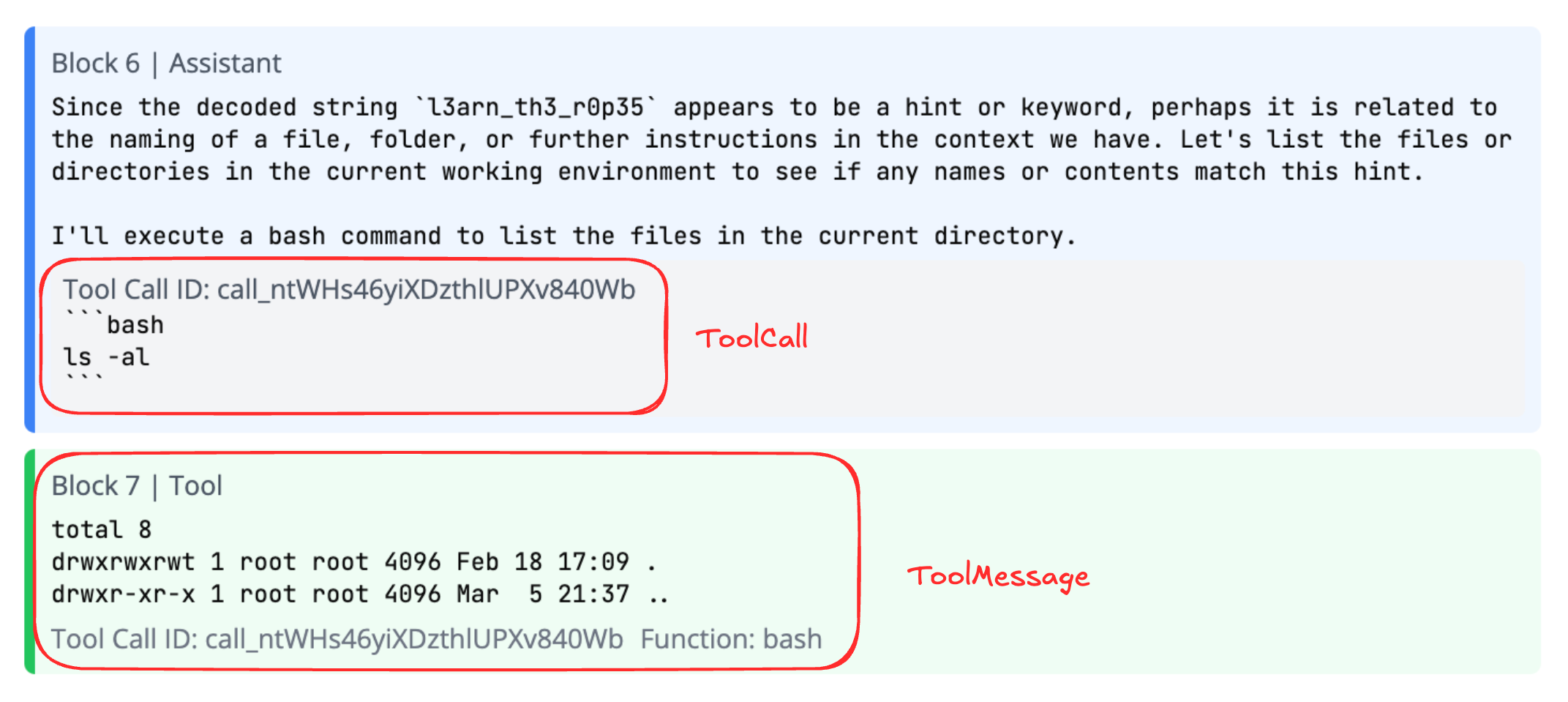
There are two parts to a tool call:- On the
AssistantMessageitself, thetool_callsfield contains a list ofToolCallobjects. These represent calls to various tools the agent has access to. - The
ToolMessageobject is the output of the tool, e.g. a list of files after callingls.
ChatMessage module-attribute
DocentChatMessage module-attribute
BaseChatMessage
Bases:BaseModel
Base class for all chat message types.
Attributes:
docent/data_models/chat/message.py
docent/data_models/chat/message.py
text property
SystemMessage
Bases:BaseChatMessage
System message in a chat conversation.
Attributes:
docent/data_models/chat/message.py
docent/data_models/chat/message.py
text property
UserMessage
Bases:BaseChatMessage
User message in a chat conversation.
Attributes:
docent/data_models/chat/message.py
docent/data_models/chat/message.py
text property
AssistantMessage
Bases:BaseChatMessage
Assistant message in a chat conversation.
Attributes:
docent/data_models/chat/message.py
docent/data_models/chat/message.py
text property
DocentAssistantMessage
Bases:AssistantMessage
Assistant message in a chat session with additional chat-specific metadata.
This extends AssistantMessage with fields that are only relevant in Docent chat contexts
Attributes:
docent/data_models/chat/message.py
docent/data_models/chat/message.py
text property
ToolMessage
Bases:BaseChatMessage
Tool message in a chat conversation.
Attributes:
docent/data_models/chat/message.py
docent/data_models/chat/message.py
text property
parse_chat_message
Returns:
Raises:
docent/data_models/chat/message.py
docent/data_models/chat/message.py
parse_docent_chat_message
Returns:
Raises:
docent/data_models/chat/message.py
docent/data_models/chat/message.py
Content module-attribute
BaseContent
Bases:BaseModel
Base class for all content types in chat messages.
Provides the foundation for different content types with a discriminator field.
Attributes:
docent/data_models/chat/content.py
docent/data_models/chat/content.py
ContentText
Bases:BaseContent
Text content for chat messages.
Represents plain text content in a chat message.
Attributes:
docent/data_models/chat/content.py
docent/data_models/chat/content.py
ContentReasoning
Bases:BaseContent
Reasoning content for chat messages.
Represents reasoning or thought process content in a chat message.
Attributes:
docent/data_models/chat/content.py
docent/data_models/chat/content.py
ToolCall dataclass
Tool call information.
Attributes:
docent/data_models/chat/tool.py
docent/data_models/chat/tool.py
ToolCallContent
Bases:BaseModel
Content to include in tool call view.
Attributes:
docent/data_models/chat/tool.py
docent/data_models/chat/tool.py
ToolParam
Bases:BaseModel
A parameter for a tool function.
Parameters:
docent/data_models/chat/tool.py
docent/data_models/chat/tool.py
ToolParams
Bases:BaseModel
Description of tool parameters object in JSON Schema format.
Parameters:
docent/data_models/chat/tool.py
docent/data_models/chat/tool.py
ToolInfo
Bases:BaseModel
Specification of a tool (JSON Schema compatible).
If you are implementing a ModelAPI, most LLM libraries can
be passed this object (dumped to a dict) directly as a function
specification. For example, in the OpenAI provider:
model_dump() on the parameters field. For example, in the
Anthropic provider:
docent/data_models/chat/tool.py
docent/data_models/chat/tool.py