> ## Documentation Index
> Fetch the complete documentation index at: https://docs.transluce.org/llms.txt
> Use this file to discover all available pages before exploring further.
# Reading Steps
> Use language models to evaluate, classify, and synthesize agent-run data inside an Analysis Plan.
A Reading step uses a language model to evaluate the results of a DQL query, which may return transcripts, metadata, prior Reading results, or text. Reading steps are most helpful for operations like classifying transcripts, extracting structured information, or synthesizing results across runs. Your coding agent generates Reading steps inside [Analysis Plans](/analysis/analysis-plans) that you may approve in the UI. To skip approval, instruct your coding agent to "auto approve all reading steps."
## Inputs
Every Reading step is paired with a [DQL query](/analysis/dql-steps) that selects its inputs. The DQL query determines which runs (or which prior results) the Reading step sees and how they're grouped, giving you precise control over what it evaluates.
Each parameter in a Reading step's prompt template has a type that determines what data it carries:
| Type | Description |
| ------------------ | ------------------------------------------------------------- |
| `transcript` | A full transcript and transcript-level metadata |
| `transcript_slice` | A contiguous portion of a transcript, e.g., the last N turns. |
| `agent_run` | All transcripts in an AgentRun and run-level metadata |
| `reading_result` | The output of a prior Reading step. |
| `text` | A string derived from a metadata field or DQL expression. |
Any parameter can be a list selected with `ARRAY_AGG`. This is useful when the number of desired inputs varies row to row.
## Context selection
Beyond choosing *which* runs a Reading step sees, you can control *how much* of each run is rendered into the judge's context. Two mechanisms are available: transcript slices select a window of messages, and context configs select which metadata fields appear alongside them.
By default, the judge sees the full message content of every input — for an `agent_run` parameter, that's all transcripts plus the names of transcripts and transcript groups. Metadata at every level (agent run, transcript group, transcript, message) is hidden unless a context config includes it.
### Transcript slices
A `transcript_slice` parameter renders a contiguous range of messages instead of the whole transcript. Slices are produced in the DQL step with the `transcript_slice(transcript_id, start_idx, end_idx)` function:
```sql theme={null}
-- The last 5 messages of each transcript
SELECT transcript_slice(transcripts.id, -5, -1) AS ending
FROM transcripts
```
Slice behavior:
* `start_idx` and `end_idx` are 0-based message indices, inclusive on both ends. They may be equal to render a single message.
* Negative indices count from the end using Python's index direction (`-1` is the last message, `-2` is the second-to-last), but the range is still inclusive on both ends: `(-5, -1)` includes the last five messages.
* Out-of-range indices don't error; the slice just renders fewer messages.
* Rendered messages keep their original indices, so the judge's citations still point to absolute positions in the full transcript.
Because the bounds are ordinary DQL expressions, they can be computed per row — for example, a window around an error location stored in metadata:
```sql theme={null}
SELECT transcript_slice(
t.id,
GREATEST(0, CAST(t.metadata_json->>'first_error_idx' AS INTEGER) - 3),
CAST(t.metadata_json->>'first_error_idx' AS INTEGER) + 3
) AS error_window
FROM transcripts t
WHERE t.metadata_json ? 'first_error_idx'
```
### Context configs
Each `agent_run`, `transcript`, or `transcript_slice` parameter can carry a context config that controls which metadata fields — and, for agent runs, which transcripts — are rendered for the judge. Context configs don't change which rows the DQL step selects; they only change how each selected item is formatted.
The available filters depend on the parameter type:
| Filter | `agent_run` | `transcript` / `transcript_slice` | Default |
| --------------------------- | ----------- | --------------------------------- | -------- |
| `agent_run_metadata` | ✓ | | Excluded |
| `transcript_group_names` | ✓ | | Included |
| `transcript_group_metadata` | ✓ | | Excluded |
| `transcript_names` | ✓ | | Included |
| `transcript_metadata` | ✓ | ✓ | Excluded |
| `message_metadata` | ✓ | ✓ | Excluded |
Each filter is a pair of glob pattern lists, `include` and `exclude`, matched against dot-separated paths in the metadata (e.g., `task.difficulty`, `usage.prompt_tokens`). Including a parent path includes its whole subtree; more specific patterns win, and on a tie, exclude wins. The name filters (`transcript_names`, `transcript_group_names`) match object names rather than metadata paths, which lets you render only specific transcripts from a multi-transcript run.
In an SDK script, context configs are passed to `client.read()` as a dict keyed by parameter name:
```python theme={null}
from docent.data_models.context_config import AgentRunContextConfig
from docent.data_models.metadata_util import GlobFilter
runs = client.query(
collection_id,
"SELECT agent_runs.id AS run FROM agent_runs LIMIT 50",
name="Sample runs",
)
reading = client.read(
prompt_template=[
"Evaluate this run, using the included metadata when relevant: ",
runs.run.as_type("agent_run"),
],
context_configs={
"run": AgentRunContextConfig(
# Show task config and score, hide all other run metadata
agent_run_metadata=GlobFilter(include=("task.*", "score")),
# Render only the main and solver transcripts
transcript_names=GlobFilter(include=("main", "solver-*")),
),
},
model="openai/gpt-5.4-mini",
name="Evaluate runs with task metadata",
)
```
Context configs are part of a Reading step's identity: changing one produces a different content hash, so cached results from the old configuration won't be reused.
## Output schema
The output schema is a [JSON Schema](https://json-schema.org/) object that constrains the judge's response. Standard types (`string`, `number`, `boolean`) and `enum` values are supported. Set `"citations": true` on a string field to have the judge ground its output in specific passages from the input. The coding agent proposes a schema based on your question; you can ask it to add, remove, or rename fields.
```json theme={null}
{
"type": "object",
"properties": {
"summary": {
"type": "string",
"citations": true
}
},
"required": ["summary"]
}
```
```json theme={null}
{
"type": "object",
"properties": {
"match": {
"type": "string",
"enum": ["match", "no match"]
},
"explanation": {
"type": "string",
"citations": true
}
},
"required": ["match", "explanation"]
}
```
## Reading steps in the plan UI
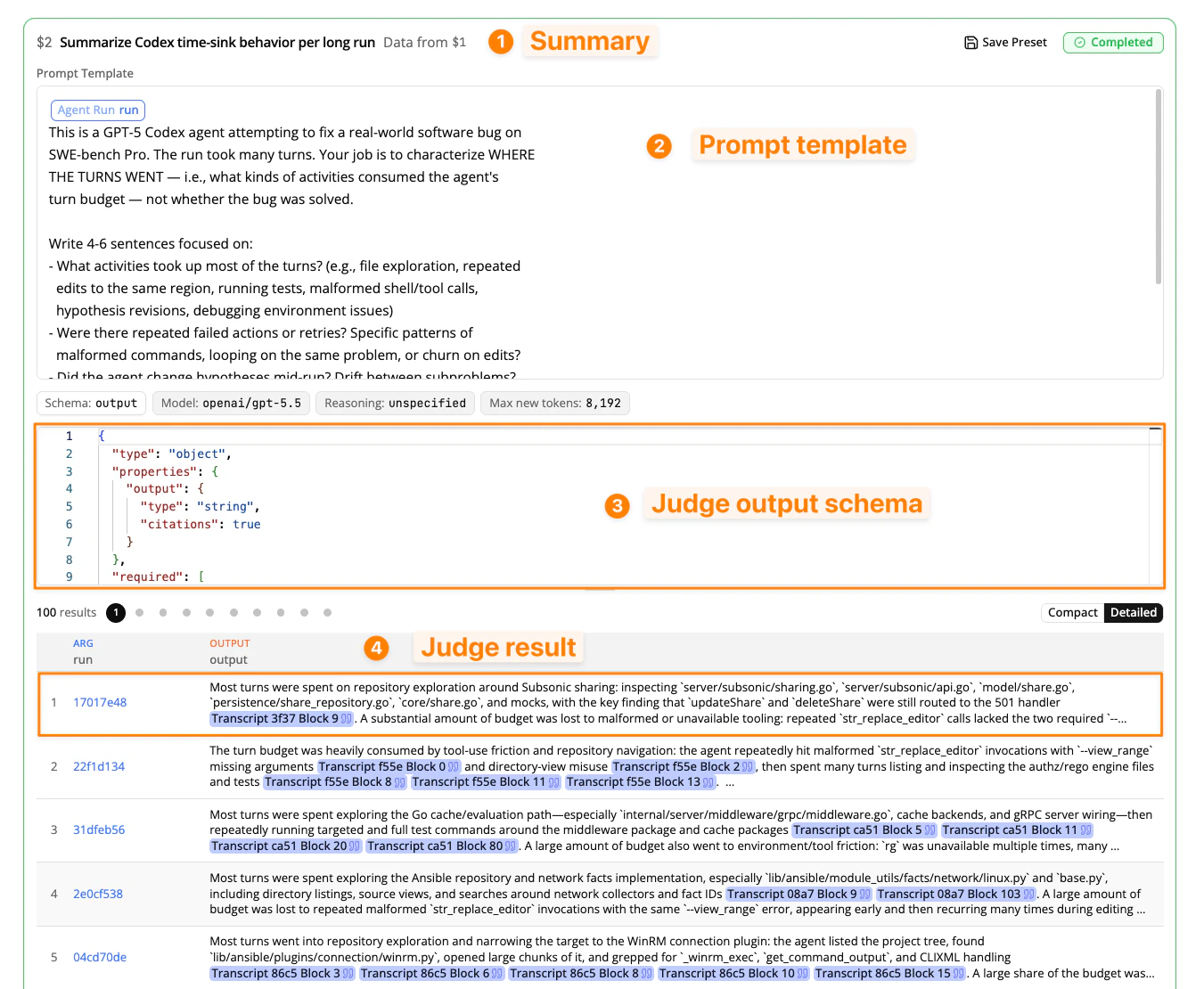
When your coding agent generates an Analysis Plan, each Reading step appears in the UI with four sections:
1. **Summary.** A one-line description of what the step does, with the step's alias (e.g., `$2`) and the step it reads from (e.g., "Data from `$1`"). Other steps reference this step's output by alias.
2. **Prompt template.** The full prompt the judge receives for each input row. Parameters appear as labeled pills. When the step is run, the parameters are filled from the input data.
3. **Output schema.** The JSON Schema that constrains the judge's response. In order to view the output schema, click on the Output Schema pill in the UI.
4. **Results.** A table of the judge's output, displaying one result row per input. You can toggle between **Compact** and **Detailed** view to see more of the output inline. Clicking on a result will open it in the sidebar, and you can use the up and down arrow keys to review different result rows.